
Jev AI Quickstart: What TypeSafe’s System One Model Is & How to Use It
Learn what Jev AI is, how TypeSafe’s System One model differs from LLMs, and how to make your first Jev API call with Choice, Score, and Noul decisions.
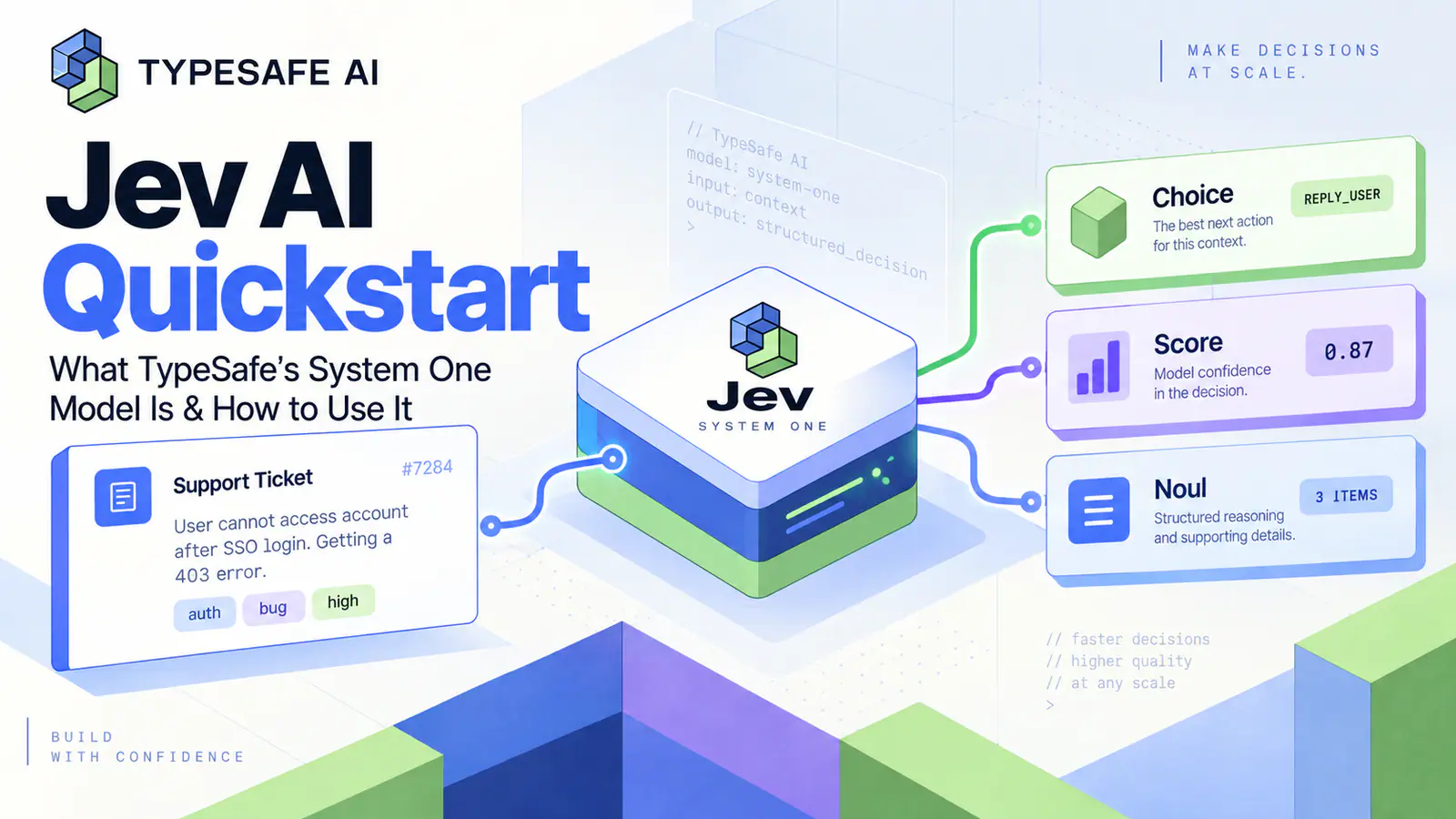
A support ticket says, “Our Stripe connection has failed for three days. We’re losing sales. Please help ASAP.” A conventional LLM can draft a helpful reply. But before anyone writes that reply, a production system usually needs to make smaller, less glamorous decisions: Which team owns this? Is the customer urgent? Should a human see it first?
That is the gap TypeSafe’s Jev is designed to address. Jev is not a chatbot and it is not a replacement for a general-purpose LLM. It is a System One model: a model for making fast, bounded, typed decisions that application code can inspect and act on.
This guide explains where Jev fits, how its three question types work, and how to make a first API call without confusing a well-formed answer for a guaranteed-correct one.
The short version
Jev turns a piece of text or structured textual state into predefined decisions. Instead of asking a model to write a paragraph about a ticket, you give it the ticket state and ask questions with known output shapes.
| If the application needs to… | Use | What the application receives |
|---|---|---|
| Pick one route from a fixed set | Choice | A selected option, option probabilities, and confidence |
| Assess position on an ordered scale | Score | A probability-weighted score, level probabilities, and confidence |
| Test one clear proposition | Noul | The probability that the proposition is true |
| Write, explain, brainstorm, or converse | A general-purpose LLM | Generated text, code, or multimodal output |
The useful design principle is simple: let the model judge a bounded question; let your code decide what to do next.
What makes a System One model different?
The name comes from the idea of fast, focused judgment. In TypeSafe’s System One overview, the model does not produce a free-form explanation, code sample, or customer reply. It evaluates the state against questions you define, returning structured results with probabilities.
That distinction matters in systems that run the same kinds of checks repeatedly. A support workflow may need to classify a message, score apparent frustration, detect urgency, and decide whether to escalate. An agent loop may need to choose the next tool, reject a risky action, or verify that a subtask is complete. These are decision points, not writing prompts.
Jev’s value is therefore not that it makes every decision correct. Its value is that it makes the decision boundary explicit. Your software knows the allowed choices, sees the distribution behind the result, and can apply its own thresholds, business rules, logging, and human-review policy.

Start with a question your code can use
A good first Jev integration begins with a constraint, not a broad instruction. “Understand this customer” is too vague. Break it into questions with a clear downstream use:
- Choice: Which team should handle this ticket: billing, technical, or sales?
- Score: How frustrated does the customer appear on a three-level scale?
- Noul: Does this message convey urgency or time sensitivity?
This decomposition has an operational benefit. Each decision can be evaluated against the same state, while your application combines the results. You can route a high-confidence technical issue automatically, send ambiguous cases to a queue, and trigger a human review when any one safety-relevant signal crosses a threshold.
The three primitives are intentionally different:
Choice: classify among known options
Use Choice when the outcome is one of several predefined categories that do not have a natural order. Ticket routing, lead source classification, content category selection, and agent-tool selection are typical examples.
Keep the choices mutually understandable. If two labels overlap—such as technical and integration—the model may be forced to resolve an ambiguity your workflow never defined. Improve the categories or add a separate question before you try to tune a threshold.
Score: measure an ordered condition
Use Score when levels have a meaningful order. A practical support scale might be calm, frustrated but civil, and very angry. The returned score is a probability-weighted position over the levels you supplied, so it can fall between levels.
That makes Score useful for prioritization, moderation intensity, or lead quality. It is not a substitute for a clinical, legal, or high-stakes assessment. In those contexts, retain a review path and validate the whole workflow with representative examples.
Noul: test one proposition
Use Noul for a yes/no proposition, phrased precisely enough that two humans would know what evidence to look for. “Does this message request a refund?” is stronger than “Is this customer unhappy?”
A Noul value near 1 means the model assigns high probability to the proposition being true; a value near 0 means the opposite. A value near 0.5 does not mean “medium urgency.” It means the model sees the two outcomes as similarly likely. If urgency has meaningful levels, add a Score question instead.
Your first Jev API call
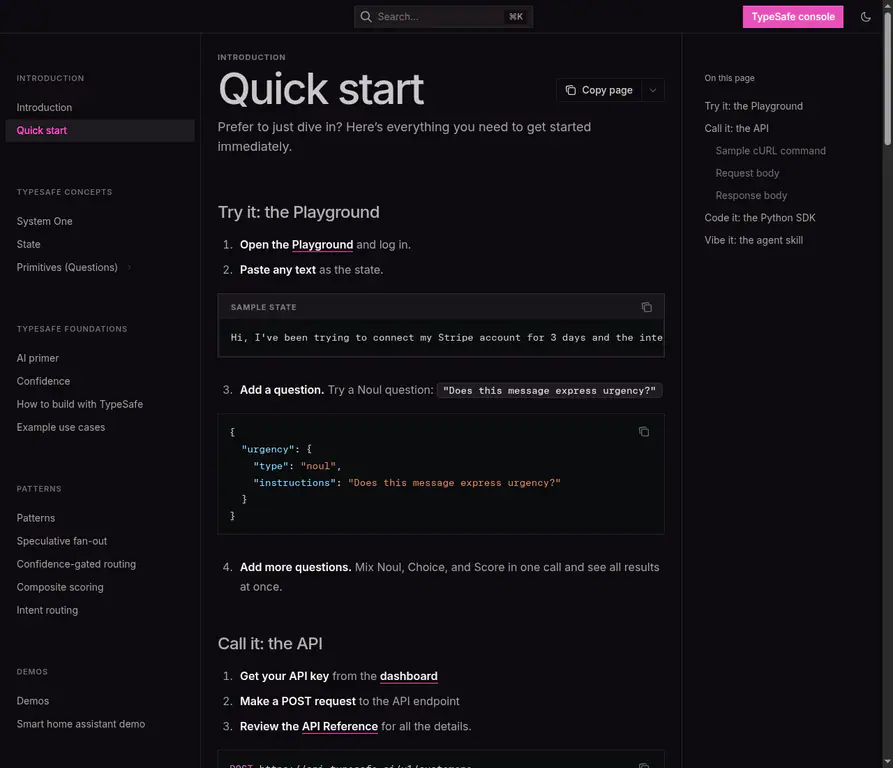
The current Quick start follows a direct pattern: send a textual state, name a model, and supply a questions object. Before sending code, you can run the same state in the Playground to see how the question wording changes the result.
Here is a compact support-routing request. It deliberately asks several narrow questions about the same ticket rather than asking for a single all-purpose judgment.
curl -X POST https://api.typesafe.ai/v1/systemone \
  -H "Authorization: Bearer $TYPESAFE_API_KEY" \
  -H "Content-Type: application/json" \
  -d @- <<'EOF'
{
  "state": "Our Stripe connection has failed for three days. We are losing sales and need help as soon as possible.",
  "model": "jev-latest",
  "questions": {
    "owner": {
      "type": "choice",
      "instructions": "Which team should handle this ticket?",
      "criteria": {
        "billing": "Payment, invoice, or subscription issue",
        "technical": "Bug, integration, or product malfunction",
        "sales": "Pricing, plan, or account inquiry"
      }
    },
    "frustration": {
      "type": "score",
      "instructions": "How frustrated does the customer appear?",
      "criteria": [
        "Calm or factual",
        "Frustrated but civil",
        "Very angry or using strong language"
      ]
    },
    "is_urgent": {
      "type": "noul",
      "instructions": "The message conveys urgency or time sensitivity."
    }
  }
}
EOF
The response contains an answers object keyed by the question IDs. A Choice answer includes the selected option, probabilities for the available options, and confidence; Score includes a score, probabilities, a level legend, and confidence; Noul returns its probability directly. The API reference documents the complete request and response shape.
Turn probabilities into a policy, not a promise
The most important part of the integration is often the code after the model call. Treat the answer as a signal inside a policy you can explain and revise.
owner = response.answers["owner"]
urgent = response.answers["is_urgent"].noul

if owner.choice == "technical" and owner.confidence >= 0.85 and urgent >= 0.80:
    route_to_priority_technical_queue()
elif owner.confidence < 0.65 or 0.40 <= urgent <= 0.60:
    send_to_human_triage()
else:
    route_to_standard_queue(owner.choice)
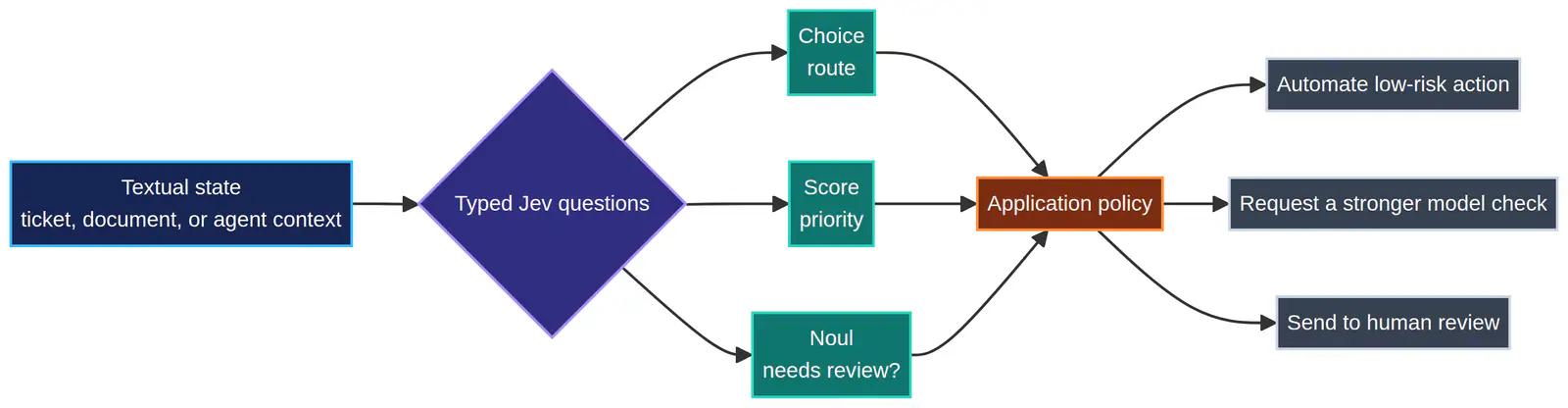
Those values are examples, not universal defaults. TypeSafe describes its probabilities as calibrated across groups of predictions; that does not guarantee that one individual result is correct. Start by logging inputs, answers, confidence, and downstream outcomes. Then review false positives and false negatives by workflow, language, customer segment, and question wording.
This is also why “Jev does not hallucinate” is the wrong claim. The model cannot invent a brand-new output type when you only permit a fixed Choice, Score, or Noul response. It can still make a poor judgment about the underlying state. Structured output solves one class of reliability problem; evaluation and escalation solve another.
Use the Python SDK when the workflow belongs in your application
If you prefer a client instead of raw HTTP, TypeSafe’s Python SDK guide documents typesafe-sdk for Python 3.10+ and reads TYPESAFE_API_KEY from the environment. The same question design applies:
from typesafe_sdk import Choice, Noul, TypeSafeClient

client = TypeSafeClient()

response = client.system_one(
    state="The account owner says checkout has failed three times today.",
    questions={
        "route": Choice(
            instructions="Which team should handle this?",
            criteria={
                "technical": "Checkout or product malfunction",
                "billing": "Payment, invoice, or subscription issue",
                "sales": "Plan, pricing, or account inquiry",
            },
        ),
        "needs_fast_response": Noul(
            instructions="This message requires a response within one business hour.",
        ),
    },
)

print(response.answers["route"].choice)
print(response.answers["needs_fast_response"].noul)
One practical caution: jev-latest is convenient while experimenting, but an alias can change as models are released. When reproducibility and threshold tuning matter, inspect the returned model and consider pinning a versioned model ID from the models documentation.
Where Jev is most useful
Jev works best when the application makes the same bounded decision many times and a generated paragraph would only need to be parsed back into a rule. Strong starting points include:
| Workflow | What Jev can decide | What code should still control |
|---|---|---|
| Support operations | Route, urgency, frustration, escalation need | SLAs, queue assignment, human handoff |
| AI agents | Next tool, completion check, action risk | Permissions, tool execution, retry limits |
| Moderation | Which policy queue applies, review priority | Enforcement, appeal path, irreversible actions |
| Lead operations | Fit category, intent, follow-up priority | CRM writes, outreach rules, ownership |
| Document review | Relevance, extraction confidence, exception flag | Final records, audit trail, approvals |
For a concrete example of applying typed decisions around an agent loop, see this Jev harness pattern. The larger lesson is not to push every judgment into Jev. Use it where the output can stay bounded and where your surrounding code can safely absorb uncertainty.
<iframe width="100%" height="440" src="https://www.youtube.com/embed/CcmqPS6q9Gw" title="A developer walkthrough of Jev’s typed-decision workflow" frameborder="0" allow="accelerometer; autoplay; clipboard-write; encrypted-media; gyroscope; picture-in-picture; web-share" allowfullscreen></iframe>
Constraints to design around
Jev currently works on text-based state: a string, a JSON object, or arrays of text values. It is not a direct image, audio, video, or binary-input model. Keep the state focused, because the input budget includes both the state and your questions.
Question wording also matters more than a prompt-only workflow may suggest. Avoid packing several judgments into one instruction, such as “Is this customer angry, likely to churn, and entitled to a refund?” Ask separate atomic questions, then let the application combine them. Questions sent together do not use one another’s answers, which is exactly why the aggregation rule belongs in your code.
Finally, test your own language and domain. English is the primary language documented for the model; other languages may be accepted but should be evaluated against the workload you actually intend to automate.
A good first experiment
Do not begin with a full autonomous agent. Choose one repeatable decision that currently costs a person a few seconds per case: ticket routing, escalation detection, “needs review” gating, or ranking a short queue.
Build a small labeled test set. Write the question and criteria. Compare the model’s probabilities with the outcome your team would want. Add a human-review band for uncertain cases. Only then automate a low-risk action.
That is the practical promise of Jev: not one model doing everything, but a clear decision layer between unstructured input and the code that has to live with the result.